OpenAI

April 27, 2026

Engineering

An open-source spec for Codex orchestration: Symphony

By Alex Kotliarskyi, Victor Zhu, and Zach Brock

Loading…

Six months ago, while working on an internal productivity tool, our team made a controversial (at the time) decision: we’d build our repo with no human-written code. Every line in our project repository had to be generated by Codex.

To make that work, we redesigned our engineering workflow from the ground up. We built an agent-friendly repository, invested heavily in automated tests and guardrails, and treated Codex as a full-fledged teammate. We documented that journey in our previous blog post on harness engineering.

And it worked, but then we ran into the next bottleneck: context switching.

To solve this new problem, we built a system called Symphony. Symphony(opens in a new window) is an agent orchestrator that turns a project-management board like Linear into a control plane for coding agents. Every open task gets an agent, agents run continuously, and humans review the results.

This post explains how we created Symphony—resulting in a 500% increase in landed pull requests on some teams—and how to use it to turn your own issue tracker into an always-on agent orchestrator.

The ceiling of interactive coding agents

Even as they get easier to use, coding agents—whether accessed through web apps or CLI—are still interactive tools.

As the scale of agentic work increased at OpenAI, we found a new kind of burden. Each engineer would open a few Codex sessions, assign tasks, review the output, steer the agent, and repeat. In practice, most people could comfortably manage three to five sessions at a time before context switching became painful. Beyond that, productivity dropped. We'd forget which session was doing what, jump between terminals to nudge agents back on track, and debug long-running tasks that stalled halfway through.

The agents were fast, but we had a system bottleneck: human attention. We had effectively built a team of extremely capable junior engineers, then assigned our human engineers to micromanaging them. That wasn’t going to scale.

A shift in perspective

We realized we were optimizing the wrong thing. We were orienting our system around coding sessions and merged PRs, when PRs and sessions are really a means to an end. Software workflows are largely organized around deliverables: issues, tasks, tickets, milestones.

So we asked ourselves what would happen if we stopped supervising agents directly and instead let them pull work from our task tracker.

That idea became Symphony, a written spec that functions as a supervisor to orchestrate agentic work.

Turning our issue tracker into an agent orchestrator

Symphony started with a simple concept: any open task should get picked up and completed by an agent. Instead of managing Codex sessions in multiple tabs, we made our issue tracker the control plane.


In this setup, each open Linear issue maps to a dedicated agent workspace. Symphony continuously watches the task board and ensures that every active task has an agent running in the loop until it’s done. If an agent crashes or stalls, Symphony restarts it. If new work appears, Symphony picks it up and starts organizing work.

We built our workflow based on ticket statuses, using the task manager Linear as a state machine.

Coding agents use Linear as a state machine to work alongside us.

In practice, Symphony decouples work from sessions and from pull requests. Some issues produce multiple PRs across repos; others are pure investigation or analysis that never touch the codebase.

Once work is abstracted this way, tickets can represent much larger units of work.

We regularly use Symphony to orchestrate complex features and infrastructure migrations. For example, we might file a task asking the agent to analyze the codebase, Slack, or Notion and produce an implementation plan. Once we’re happy with the plan, the agent generates a tree of tasks, breaking the work into stages and defining dependencies between tasks.

Agents only start working on tasks that aren’t blocked, so execution unfolds naturally and optimally in parallel for this DAG (a sequence of execution steps). For example, we marked the React upgrade as blocked on a migration to Vite. As expected, agents started upgrading React only after the migration to Vite was complete.

Agents can also create work themselves. During implementation or review, they often notice improvements that fall outside the scope of the current task: a performance issue, a refactoring opportunity, or a better architecture. When that happens, they simply file a new issue that we can evaluate and schedule later—many of these follow-up tasks also get picked up by agents. While we oversee this process, agents stay organized and keep work moving forward.

This way of working dramatically reduces the cognitive cost of kicking off ambiguous work. If the agent gets something wrong, that’s still useful information, and the cost to us is near zero. We can very cheaply file tickets for the agent to go prototype and explore, and throw away any explorations we don’t like.

Because the orchestrator runs on devboxes and never sleeps, we can add tasks from anywhere and know an agent will pick it up. For instance, one engineer on our team made three significant changes from the Linear app on his phone from a cozy cabin on shoddy wifi.

An increase in exploration from working this way

When observing the effects of working with Symphony, the most obvious change was output. Among some teams at OpenAI, we saw the number of landed PRs increase by 500% in the first three weeks. Outside of OpenAI, Linear founder Karri Saarinen highlighted a spike in workspaces created(opens in a new window) as we released Symphony. However, the deeper shift is how teams think about work.

When our engineers no longer spend time supervising Codex sessions, the economics of code changes completely. The perceived cost of each change drops because we’re no longer investing human effort in driving the implementation itself.

That changed our behavior. It's become trivial to spin up speculative tasks in Symphony. Try an idea, explore a refactor, test a hypothesis, and only keep the results that look promising.

It also broadens who can initiate work. Our product manager and designer can now file feature requests directly into Symphony. They don’t need to check out the repo or manage a Codex session. They describe the feature and get back a review packet that includes a video walkthrough of the feature working inside the real product.

Symphony also shines in large monorepos (like the one we have at OpenAI) where the last mile of landing a PR is slow and fragile. The system watches CI, rebases when needed, resolves conflicts, retries flaky checks, and generally shepherds changes through the pipeline. By the time a ticket reaches Merging, we have high confidence the change will make it into the main branch without human babysitting.
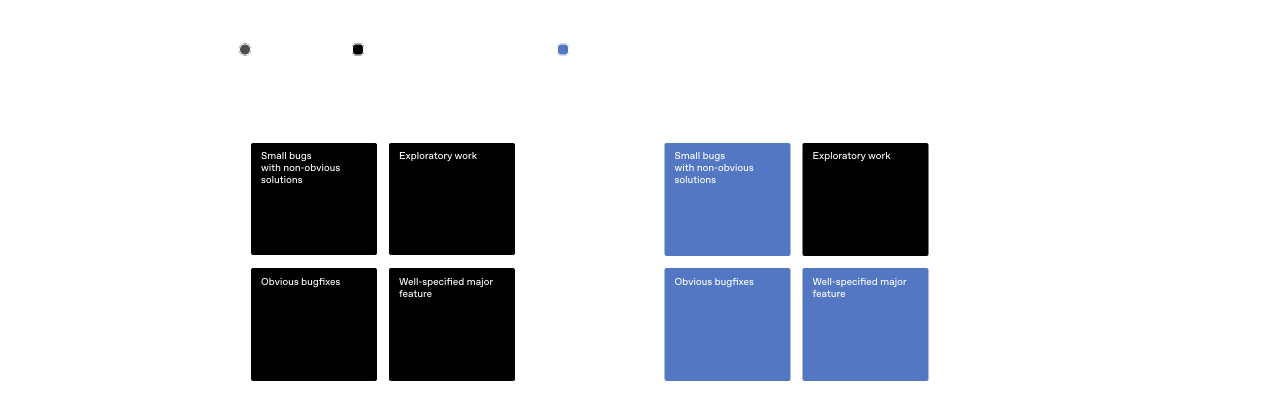
Before and after grid of Symphony

After implementing Symphony, we delegate more work to agents and focus on harder, more exploratory tasks.

Progress comes with new, different problems

Operating at this level comes with tradeoffs. When we moved from steering agents interactively to assigning them work at the ticket level, we lost the ability to constantly nudge them mid-flight and course-correct when needed. Sometimes the agent produced something that completely missed the mark. That was useful—those failures revealed gaps in the system and helped us make it more robust.

Instead of patching the result manually, we added guardrails and skills so the agents could succeed the next time. Over time, this led us to add new capabilities to our harness, like running end-to-end tests, driving the app through Chrome DevTools, and managing QA smoke tests. We significantly improved our documentation and clarified what good looks like.

Not every task fits the Symphony style of work. Some problems still require engineers working directly with interactive Codex sessions, especially ambiguous problems or work that requires strong judgment and expertise. In practice, these are usually the most interesting and enjoyable tasks for our engineers to spend time on.

The difference is that Symphony can handle the bulk of routine implementation work. That lets engineers focus on a single hard problem at a time instead of constantly context-switching between smaller tasks.

We also learned that treating agents as rigid nodes in a state machine doesn’t work well. Models get smarter and can solve bigger problems than the box we try to fit them in. Our early versions of agentic work was only asking Codex to implement the task. That approach proved too limiting. Codex is perfectly capable of creating multiple PRs as well as reading review feedback and addressing it. So we gave it tools—gh CLI, skills to read CI logs, etc.—and now we can ask Codex to do more, like closing old PRs or pulling reports on completed vs. abandoned work. These types of tasks fell way outside the initial feature implementation box.

So we eventually moved toward giving agents objectives instead of strict transitions, much like a good manager would assign a goal to a direct report on their team. The power of models comes from their ability to reason, so give them tools and context and let them cook.

Using Symphony to build Symphony

When you open the Symphony repository,(opens in a new window) the first thing you’ll notice is that Symphony is technically just a SPEC.md file—a definition of the problem and the intended solution. Rather than building a complex supervision system, we defined the problem and intended solutions, giving agents high-level steering.

Markdown

1
# Symphony Service Specification
2

3
Status: Draft v1 (language-agnostic)
4

5
Purpose: Define a service that orchestrates coding agents to get project work done.
6

7
## 1. Problem Statement
8

9
Symphony is a long-running automation service that continuously reads work from an issue tracker
10
(Linear in this specification version), creates an isolated workspace for each issue, and runs a
11
coding agent session for that issue inside the workspace.
12

13
The service solves four operational problems:
14

15
- It turns issue execution into a repeatable daemon workflow instead of manual scripts.
16
- It isolates agent execution in per-issue workspaces so agent commands run only inside per-issue
17
workspace directories.
18
- It keeps the workflow policy in-repo (`WORKFLOW.md`) so teams version the agent prompt and runtime
19
settings with their code.
20
- It provides enough observability to operate and debug multiple concurrent agent runs.
21

22
Implementations are expected to document their trust and safety posture explicitly. This
23
specification does not require a single approval, sandbox, or operator-confirmation policy; some
24
implementations may target trusted environments with a high-trust configuration, while others may
25
require stricter approvals or sandboxing.
26

27
Important boundary:
28

29
- Symphony is a scheduler/runner and tracker reader.
30
- Ticket writes (state transitions, comments, PR links) are typically performed by the coding agent
31
using tools available in the workflow/runtime environment.
32
- A successful run may end at a workflow-defined handoff state (for example `Human Review`), not
33
necessarily `Done`.
34

35
## 2. Goals and Non-Goals
36

37
### 2.1 Goals
38

39
- Poll the issue tracker on a fixed cadence and dispatch work with bounded concurrency.
40
- Maintain a single authoritative orchestrator state for dispatch, retries, and reconciliation.
41
- Create deterministic per-issue workspaces and preserve them across runs.
42
- Stop active runs when issue state changes make them ineligible.
43
- Recover from transient failures with exponential backoff.
44
- Load runtime behavior from a repository-owned `WORKFLOW.md` contract.
45
- Expose operator-visible observability (at minimum structured logs).
46
- Support restart recovery without requiring a persistent database.
47

48
### 2.2 Non-Goals
49

50
- Rich web UI or multi-tenant control plane.
51
- Prescribing a specific dashboard or terminal UI implementation.
52
- General-purpose workflow engine or distributed job scheduler.
53
- Built-in business logic for how to edit tickets, PRs, or comments. (That logic lives in the
54
workflow prompt and agent tooling.)
55
- Mandating strong sandbox controls beyond what the coding agent and host OS provide.
56
- Mandating a single default approval, sandbox, or operator-confirmation posture for all
57
implementations.
58

59
## 3. System Overview
60

61
### 3.1 Main Components
62

63
1. `Workflow Loader`
64
- Reads `WORKFLOW.md`.
65
- Parses YAML front matter and prompt body.
66
- Returns `{config, prompt_template}`.
67

68
2. `Config Layer`
69
- Exposes typed getters for workflow config values.
70
- Applies defaults and environment variable indirection.
71
- Performs validation used by the orchestrator before dispatch.
72

73
3. `Issue Tracker Client`
74
- Fetches candidate issues in active states.
75
- Fetches current states for specific issue IDs (reconciliation).
76
- Fetches terminal-state issues during startup cleanup.
77
- Normalizes tracker payloads into a stable issue model.
78

79
4. `Orchestrator`
80
- Owns the poll tick.
81
- Owns the in-memory runtime state.
82
- Decides which issues to dispatch, retry, stop, or release.
83
- Tracks session metrics and retry queue state.
84

85
5. `Workspace Manager`
86
- Maps issue identifiers to workspace paths.
87
- Ensures per-issue workspace directories exist.
88
- Runs workspace lifecycle hooks.
89
- Cleans workspaces for terminal issues.
90

91
6. `Agent Runner`
92
- Creates workspace.
93
- Builds prompt from issue + workflow template.
94
- Launches the coding agent app-server client.
95
- Streams agent updates back to the orchestrator.
96

97
7. `Status Surface` (optional)
98
- Presents human-readable runtime status (for example terminal output, dashboard, or other
99
operator-facing view).
100
101
8. `Logging`
102
- Emits structured runtime logs to one or more configured sinks.
103

104
### 3.2 Abstraction Levels
105

106
Symphony is easiest to port when kept in these layers:
107

108
1. `Policy Layer` (repo-defined)
109
- `WORKFLOW.md` prompt body.
110
- Team-specific rules for ticket handling, validation, and handoff.
111

112
2. `Configuration Layer` (typed getters)
113
- Parses front matter into typed runtime settings.
114
- Handles defaults, environment tokens, and path normalization.
115

116
3. `Coordination Layer` (orchestrator)
117
- Polling loop, issue eligibility, concurrency, retries, reconciliation.
118

119
4. `Execution Layer` (workspace + agent subprocess)
120
- Filesystem lifecycle, workspace preparation, coding-agent protocol.
121

122
5. `Integration Layer` (Linear adapter)
123
- API calls and normalization for tracker data.
124

125
6. `Observability Layer` (logs + optional status surface)
126
- Operator visibility into orchestrator and agent behavior.
127

128
### 3.3 External Dependencies
129

130
- Issue tracker API (Linear for `tracker.kind: linear` in this specification version).
131
- Local filesystem for workspaces and logs.
132
- Optional workspace population tooling (for example Git CLI, if used).
133
- Coding-agent executable that supports JSON-RPC-like app-server mode over stdio.
134
- Host environment authentication for the issue tracker and coding agent.
135

136
## 4. Core Domain Model
137

138
### 4.1 Entities
139

140
#### 4.1.1 Issue
141

142
Normalized issue record used by orchestration, prompt rendering, and observability output.
143

144
Fields:
145

146
- `id` (string)
147
- Stable tracker-internal ID.
148
- `identifier` (string)
149
- Human-readable ticket key (example: `ABC-123`).
150
- `title` (string)
151
- `description` (string or null)
152
- `priority` (integer or null)
153
- Lower numbers are higher priority in dispatch sorting.
154
- `state` (string)
155
- Current tracker state name.
156
- `branch_name` (string or null)
157
- Tracker-provided branch metadata if available.
158
- `url` (string or null)
159
- `labels` (list of strings)
160
- Normalized to lowercase.
161
- `blocked_by` (list of blocker refs)
162
- Each blocker ref contains:
163
- `id` (string or null)
164
- `identifier` (string or null)
165
- `state` (string or null)
166
- `created_at` (timestamp or null)
167
- `updated_at` (timestamp or null)
168

169
#### 4.1.2 Workflow Definition
170

171
Parsed `WORKFLOW.md` payload:
172

173
- `config` (map)
174
- YAML front matter root object.
175
- `prompt_template` (string)
176
- Markdown body after front matter, trimmed.
177

178
#### 4.1.3 Service Config (Typed View)
179

180
Typed runtime values derived from `WorkflowDefinition.config` plus environment resolution.
181

182
Examples:
183

184
- poll interval
185
- workspace root
186
- active and terminal issue states
187
- concurrency limits
188
- coding-agent executable/args/timeouts
189
- workspace hooks
190

191
#### 4.1.4 Workspace
192

193
Filesystem workspace assigned to one issue identifier.
194

195
Fields (logical):
196

197
- `path` (workspace path; current runtime typically uses absolute paths, but relative roots are
198
possible if configured without path separators)
199
- `workspace_key` (sanitized issue identifier)
200
- `created_now` (boolean, used to gate `after_create` hook)
201

202
#### 4.1.5 Run Attempt
203

204
One execution attempt for one issue.
205

206
Fields (logical):
207

208
- `issue_id`
209
- `issue_identifier`
210
- `attempt` (integer or null, `null` for first run, `>=1` for retries/continuation)
211
- `workspace_path`
212
- `started_at`
213
- `status`
214
- `error` (optional)
215

216
#### 4.1.6 Live Session (Agent Session Metadata)
217

218
State tracked while a coding-agent subprocess is running.
219

220
Fields:
221

222
- `session_id` (string, `<thread_id>-<turn_id>`)
223
- `thread_id` (string)
224
- `turn_id` (string)
225
- `codex_app_server_pid` (string or null)
226
- `last_codex_event` (string/enum or null)
227
- `last_codex_timestamp` (timestamp or null)
228
- `last_codex_message` (summarized payload)
229
- `codex_input_tokens` (integer)
230
- `codex_output_tokens` (integer)
231
- `codex_total_tokens` (integer)
232
- `last_reported_input_tokens` (integer)
233
- `last_reported_output_tokens` (integer)
234
- `last_reported_total_tokens` (integer)
235
- `turn_count` (integer)
236
- Number of coding-agent turns started within the current worker lifetime.
237

238
#### 4.1.7 Retry Entry
239

240
Scheduled retry state for an issue.
241

242
Fields:
243

244
- `issue_id`
245
- `identifier` (best-effort human ID for status surfaces/logs)
246
- `attempt` (integer, 1-based for retry queue)
247
- `due_at_ms` (monotonic clock timestamp)
248
- `timer_handle` (runtime-specific timer reference)
249
- `error` (string or null)
250

251
#### 4.1.8 Orchestrator Runtime State
252

253
Single authoritative in-memory state owned by the orchestrator.
254

255
Fields:
256

257
- `poll_interval_ms` (current effective poll interval)
258
- `max_concurrent_agents` (current effective global concurrency limit)
259
- `running` (map `issue_id -> running entry`)
260
- `claimed` (set of issue IDs reserved/running/retrying)
261
- `retry_attempts` (map `issue_id -> RetryEntry`)
262
- `completed` (set of issue IDs; bookkeeping only, not dispatch gating)
263
- `codex_totals` (aggregate tokens + runtime seconds)
264
- `codex_rate_limits` (latest rate-limit snapshot from agent events)
265

266
### 4.2 Stable Identifiers and Normalization Rules
267

268
- `Issue ID`
269
- Use for tracker lookups and internal map keys.
270
- `Issue Identifier`
271
- Use for human-readable logs and workspace naming.
272
- `Workspace Key`
273
- Derive from `issue.identifier` by replacing any character not in `[A-Za-z0-9._-]` with `_`.
274
- Use the sanitized value for the workspace directory name.
275
- `Normalized Issue State`
276
- Compare states after `lowercase`.
277
- `Session ID`
278
- Compose from coding-agent `thread_id` and `turn_id` as `<thread_id>-<turn_id>`.
279

280
## 5. Workflow Specification (Repository Contract)
281

282
### 5.1 File Discovery and Path Resolution
283

284
Workflow file path precedence:
285

286
1. Explicit application/runtime setting (set by CLI startup path).
287
2. Default: `WORKFLOW.md` in the current process working directory.
288

289
Loader behavior:
290

291
- If the file cannot be read, return `missing_workflow_file` error.
292
- The workflow file is expected to be repository-owned and version-controlled.
293

294
### 5.2 File Format
295

296
`WORKFLOW.md` is a Markdown file with optional YAML front matter.
297

298
Design note:
299

300
- `WORKFLOW.md` should be self-contained enough to describe and run different workflows (prompt,
301
runtime settings, hooks, and tracker selection/config) without requiring out-of-band
302
service-specific configuration.
303

304
Parsing rules:
305

306
- If file starts with `---`, parse lines until the next `---` as YAML front matter.
307
- Remaining lines become the prompt body.
308
- If front matter is absent, treat the entire file as prompt body and use an empty config map.
309
- YAML front matter must decode to a map/object; non-map YAML is an error.
310
- Prompt body is trimmed before use.
311

312
Returned workflow object:
313

314
- `config`: front matter root object (not nested under a `config` key).
315
- `prompt_template`: trimmed Markdown body.
316

317
### 5.3 Front Matter Schema
318

319
Top-level keys:
320

321
- `tracker`
322
- `polling`
323
- `workspace`
324
- `hooks`
325
- `agent`
326
- `codex`
327

328
Unknown keys should be ignored for forward compatibility.
329

330
Note:
331

332
- The workflow front matter is extensible. Optional extensions may define additional top-level keys
333
(for example `server`) without changing the core schema above.
334
- Extensions should document their field schema, defaults, validation rules, and whether changes
335
apply dynamically or require restart.
336
- Common extension: `server.port` (integer) enables the optional HTTP server described in Section
337
13.7.
338

339
#### 5.3.1 `tracker` (object)
340

341
Fields:
342

343
- `kind` (string)
344
- Required for dispatch.
345
- Current supported value: `linear`
346
- `endpoint` (string)
347
- Default for `tracker.kind == "linear"`: `https://api.linear.app/graphql`
348
- `api_key` (string)
349
- May be a literal token or `$VAR_NAME`.
350
- Canonical environment variable for `tracker.kind == "linear"`: `LINEAR_API_KEY`.
351
- If `$VAR_NAME` resolves to an empty string, treat the key as missing.
352
- `project_slug` (string)
353
- Required for dispatch when `tracker.kind == "linear"`.
354
- `active_states` (list of strings)
355
- Default: `Todo`, `In Progress`
356
- `terminal_states` (list of strings)
357
- Default: `Closed`, `Cancelled`, `Canceled`, `Duplicate`, `Done`
358

359
#### 5.3.2 `polling` (object)
360

361
Fields:
362

363
- `interval_ms` (integer or string integer)
364
- Default: `30000`
365
- Changes should be re-applied at runtime and affect future tick scheduling without restart.
366

367
#### 5.3.3 `workspace` (object)
368

369
Fields:
370

371
- `root` (path string or `$VAR`)
372
- Default: `<system-temp>/symphony_workspaces`
373
- `~` and strings containing path separators are expanded.
374
- Bare strings without path separators are preserved as-is (relative roots are allowed but
375
discouraged).
376
377
#### 5.3.4 `hooks` (object)
378

379
Fields:
380

381
- `after_create` (multiline shell script string, optional)
382
- Runs only when a workspace directory is newly created.
383
- Failure aborts workspace creation.
384
- `before_run` (multiline shell script string, optional)
385
- Runs before each agent attempt after workspace preparation and before launching the coding
386
agent.
387
- Failure aborts the current attempt.
388
- `after_run` (multiline shell script string, optional)
389
- Runs after each agent attempt (success, failure, timeout, or cancellation) once the workspace
390
exists.
391
- Failure is logged but ignored.
392
- `before_remove` (multiline shell script string, optional)
393
- Runs before workspace deletion if the directory exists.
394
- Failure is logged but ignored; cleanup still proceeds.
395
- `timeout_ms` (integer, optional)
396
- Default: `60000`
397
- Applies to all workspace hooks.
398
- Non-positive values should be treated as invalid and fall back to the default.
399
- Changes should be re-applied at runtime for future hook executions.
400
401
#### 5.3.5 `agent` (object)
402

403
Fields:
404

405
- `max_concurrent_agents` (integer or string integer)
406
- Default: `10`
407
- Changes should be re-applied at runtime and affect subsequent dispatch decisions.
408
- `max_retry_backoff_ms` (integer or string integer)
409
- Default: `300000` (5 minutes)
410
- Changes should be re-applied at runtime and affect future retry scheduling.
411
- `max_concurrent_agents_by_state` (map `state_name -> positive integer`)
412
- Default: empty map.
413
- State keys are normalized (`lowercase`) for lookup.
414
- Invalid entries (non-positive or non-numeric) are ignored.
415

416
#### 5.3.6 `codex` (object)
417

418
Fields:
419

420
For Codex-owned config values such as `approval_policy`, `thread_sandbox`, and
421
`turn_sandbox_policy`, supported values are defined by the targeted Codex app-server version.
422
Implementors should treat them as pass-through Codex config values rather than relying on a
423
hand-maintained enum in this spec. To inspect the installed Codex schema, run
424
`codex app-server generate-json-schema --out <dir>` and inspect the relevant definitions referenced
425
by `v2/ThreadStartParams.json` and `v2/TurnStartParams.json`. Implementations may validate these
426
fields locally if they want stricter startup checks.
427

428
- `command` (string shell command)
429
- Default: `codex app-server`
430
- The runtime launches this command via `bash -lc` in the workspace directory.
431
- The launched process must speak a compatible app-server protocol over stdio.
432
- `approval_policy` (Codex `AskForApproval` value)
433
- Default: implementation-defined.
434
- `thread_sandbox` (Codex `SandboxMode` value)
435
- Default: implementation-defined.
436
- `turn_sandbox_policy` (Codex `SandboxPolicy` value)
437
- Default: implementation-defined.
438
- `turn_timeout_ms` (integer)
439
- Default: `3600000` (1 hour)
440
- `read_timeout_ms` (integer)
441
- Default: `5000`
442
- `stall_timeout_ms` (integer)
443
- Default: `300000` (5 minutes)
444
- If `<= 0`, stall detection is disabled.
445

446
### 5.4 Prompt Template Contract
447

448
The Markdown body of `WORKFLOW.md` is the per-issue prompt template.
449

450
Rendering requirements:
451

452
- Use a strict template engine (Liquid-compatible semantics are sufficient).
453
- Unknown variables must fail rendering.
454
- Unknown filters must fail rendering.
455

456
Template input variables:
457

458
- `issue` (object)
459
- Includes all normalized issue fields, including labels and blockers.
460
- `attempt` (integer or null)
461
- `null`/absent on first attempt.
462
- Integer on retry or continuation run.
463

464
Fallback prompt behavior:
465

466
- If the workflow prompt body is empty, the runtime may use a minimal default prompt
467
(`You are working on an issue from Linear.`).
468
- Workflow file read/parse failures are configuration/validation errors and should not silently fall
469
back to a prompt.
470

471
### 5.5 Workflow Validation and Error Surface
472

473
Error classes:
474

475
- `missing_workflow_file`
476
- `workflow_parse_error`
477
- `workflow_front_matter_not_a_map`
478
- `template_parse_error` (during prompt rendering)
479
- `template_render_error` (unknown variable/filter, invalid interpolation)
480

481
Dispatch gating behavior:
482

483
- Workflow file read/YAML errors block new dispatches until fixed.
484
- Template errors fail only the affected run attempt.
485

486
## 6. Configuration Specification
487

488
### 6.1 Source Precedence and Resolution Semantics
489

490
Configuration precedence:
491

492
1. Workflow file path selection (runtime setting -> cwd default).
493
2. YAML front matter values.
494
3. Environment indirection via `$VAR_NAME` inside selected YAML values.
495
4. Built-in defaults.
496

497
Value coercion semantics:
498

499
- Path/command fields support:
500
- `~` home expansion
501
- `$VAR` expansion for env-backed path values
502
- Apply expansion only to values intended to be local filesystem paths; do not rewrite URIs or
503
arbitrary shell command strings.
504
505
### 6.2 Dynamic Reload Semantics
506

507
Dynamic reload is required:
508

509
- The software should watch `WORKFLOW.md` for changes.
510
- On change, it should re-read and re-apply workflow config and prompt template without restart.
511
- The software should attempt to adjust live behavior to the new config (for example polling
512
cadence, concurrency limits, active/terminal states, codex settings, workspace paths/hooks, and
513
prompt content for future runs).
514
- Reloaded config applies to future dispatch, retry scheduling, reconciliation decisions, hook
515
execution, and agent launches.
516
- Implementations are not required to restart in-flight agent sessions automatically when config
517
changes.
518
- Extensions that manage their own listeners/resources (for example an HTTP server port change) may
519
require restart unless the implementation explicitly supports live rebind.
520
- Implementations should also re-validate/reload defensively during runtime operations (for example
521
before dispatch) in case filesystem watch events are missed.
522
- Invalid reloads should not crash the service; keep operating with the last known good effective
523
configuration and emit an operator-visible error.
524

525
### 6.3 Dispatch Preflight Validation
526

527
This validation is a scheduler preflight run before attempting to dispatch new work. It validates
528
the workflow/config needed to poll and launch workers, not a full audit of all possible workflow
529
behavior.
530

531
Startup validation:
532

533
- Validate configuration before starting the scheduling loop.
534
- If startup validation fails, fail startup and emit an operator-visible error.
535

536
Per-tick dispatch validation:
537

538
- Re-validate before each dispatch cycle.
539
- If validation fails, skip dispatch for that tick, keep reconciliation active, and emit an
540
operator-visible error.
541

542
Validation checks:
543

544
- Workflow file can be loaded and parsed.
545
- `tracker.kind` is present and supported.
546
- `tracker.api_key` is present after `$` resolution.
547
- `tracker.project_slug` is present when required by the selected tracker kind.
548
- `codex.command` is present and non-empty.
549

550
### 6.4 Config Fields Summary (Cheat Sheet)
551

552
This section is intentionally redundant so a coding agent can implement the config layer quickly.
553

554
- `tracker.kind`: string, required, currently `linear`
555
- `tracker.endpoint`: string, default `https://api.linear.app/graphql` when `tracker.kind=linear`
556
- `tracker.api_key`: string or `$VAR`, canonical env `LINEAR_API_KEY` when `tracker.kind=linear`
557
- `tracker.project_slug`: string, required when `tracker.kind=linear`
558
- `tracker.active_states`: list of strings, default `["Todo", "In Progress"]`
559
- `tracker.terminal_states`: list of strings, default `["Closed", "Cancelled", "Canceled", "Duplicate", "Done"]`
560
- `polling.interval_ms`: integer, default `30000`
561
- `workspace.root`: path, default `<system-temp>/symphony_workspaces`
562
- `worker.ssh_hosts` (extension): list of SSH host strings, optional; when omitted, work runs
563
locally
564
- `worker.max_concurrent_agents_per_host` (extension): positive integer, optional; shared per-host
565
cap applied across configured SSH hosts
566
- `hooks.after_create`: shell script or null
567
- `hooks.before_run`: shell script or null
568
- `hooks.after_run`: shell script or null
569
- `hooks.before_remove`: shell script or null
570
- `hooks.timeout_ms`: integer, default `60000`
571
- `agent.max_concurrent_agents`: integer, default `10`
572
- `agent.max_turns`: integer, default `20`
573
- `agent.max_retry_backoff_ms`: integer, default `300000` (5m)
574
- `agent.max_concurrent_agents_by_state`: map of positive integers, default `{}`
575
- `codex.command`: shell command string, default `codex app-server`
576
- `codex.approval_policy`: Codex `AskForApproval` value, default implementation-defined
577
- `codex.thread_sandbox`: Codex `SandboxMode` value, default implementation-defined
578
- `codex.turn_sandbox_policy`: Codex `SandboxPolicy` value, default implementation-defined
579
- `codex.turn_timeout_ms`: integer, default `3600000`
580
- `codex.read_timeout_ms`: integer, default `5000`
581
- `codex.stall_timeout_ms`: integer, default `300000`
582
- `server.port` (extension): integer, optional; enables the optional HTTP server, `0` may be used
583
for ephemeral local bind, and CLI `--port` overrides it
584

585
## 7. Orchestration State Machine
586

587
The orchestrator is the only component that mutates scheduling state. All worker outcomes are
588
reported back to it and converted into explicit state transitions.
589

590
### 7.1 Issue Orchestration States
591

592
This is not the same as tracker states (`Todo`, `In Progress`, etc.). This is the service's internal
593
claim state.
594

595
1. `Unclaimed`
596
- Issue is not running and has no retry scheduled.
597

598
2. `Claimed`
599
- Orchestrator has reserved the issue to prevent duplicate dispatch.
600
- In practice, claimed issues are either `Running` or `RetryQueued`.
601

602
3. `Running`
603
- Worker task exists and the issue is tracked in `running` map.
604

605
4. `RetryQueued`
606
- Worker is not running, but a retry timer exists in `retry_attempts`.
607

608
5. `Released`
609
- Claim removed because issue is terminal, non-active, missing, or retry path completed without
610
re-dispatch.
611
612
Important nuance:
613

614
- A successful worker exit does not mean the issue is done forever.
615
- The worker may continue through multiple back-to-back coding-agent turns before it exits.
616
- After each normal turn completion, the worker re-checks the tracker issue state.
617
- If the issue is still in an active state, the worker should start another turn on the same live
618
coding-agent thread in the same workspace, up to `agent.max_turns`.
619
- The first turn should use the full rendered task prompt.
620
- Continuation turns should send only continuation guidance to the existing thread, not resend the
621
original task prompt that is already present in thread history.
622
- Once the worker exits normally, the orchestrator still schedules a short continuation retry
623
(about 1 second) so it can re-check whether the issue remains active and needs another worker
624
session.
625

626
### 7.2 Run Attempt Lifecycle
627

628
A run attempt transitions through these phases:
629

630
1. `PreparingWorkspace`
631
2. `BuildingPrompt`
632
3. `LaunchingAgentProcess`
633
4. `InitializingSession`
634
5. `StreamingTurn`
635
6. `Finishing`
636
7. `Succeeded`
637
8. `Failed`
638
9. `TimedOut`
639
10. `Stalled`
640
11. `CanceledByReconciliation`
641

642
Distinct terminal reasons are important because retry logic and logs differ.
643

644
### 7.3 Transition Triggers
645

646
- `Poll Tick`
647
- Reconcile active runs.
648
- Validate config.
649
- Fetch candidate issues.
650
- Dispatch until slots are exhausted.
651

652
- `Worker Exit (normal)`
653
- Remove running entry.
654
- Update aggregate runtime totals.
655
- Schedule continuation retry (attempt `1`) after the worker exhausts or finishes its in-process
656
turn loop.
657
658
- `Worker Exit (abnormal)`
659
- Remove running entry.
660
- Update aggregate runtime totals.
661
- Schedule exponential-backoff retry.
662

663
- `Codex Update Event`
664
- Update live session fields, token counters, and rate limits.
665

666
- `Retry Timer Fired`
667
- Re-fetch active candidates and attempt re-dispatch, or release claim if no longer eligible.
668

669
- `Reconciliation State Refresh`
670
- Stop runs whose issue states are terminal or no longer active.
671

672
- `Stall Timeout`
673
- Kill worker and schedule retry.
674

675
### 7.4 Idempotency and Recovery Rules
676

677
- The orchestrator serializes state mutations through one authority to avoid duplicate dispatch.
678
- `claimed` and `running` checks are required before launching any worker.
679
- Reconciliation runs before dispatch on every tick.
680
- Restart recovery is tracker-driven and filesystem-driven (no durable orchestrator DB required).
681
- Startup terminal cleanup removes stale workspaces for issues already in terminal states.
682

683
## 8. Polling, Scheduling, and Reconciliation
684

685
### 8.1 Poll Loop
686

687
At startup, the service validates config, performs startup cleanup, schedules an immediate tick, and
688
then repeats every `polling.interval_ms`.
689

690
The effective poll interval should be updated when workflow config changes are re-applied.
691

692
Tick sequence:
693

694
1. Reconcile running issues.
695
2. Run dispatch preflight validation.
696
3. Fetch candidate issues from tracker using active states.
697
4. Sort issues by dispatch priority.
698
5. Dispatch eligible issues while slots remain.
699
6. Notify observability/status consumers of state changes.
700

701
If per-tick validation fails, dispatch is skipped for that tick, but reconciliation still happens
702
first.
703

704
### 8.2 Candidate Selection Rules
705

706
An issue is dispatch-eligible only if all are true:
707

708
- It has `id`, `identifier`, `title`, and `state`.
709
- Its state is in `active_states` and not in `terminal_states`.
710
- It is not already in `running`.
711
- It is not already in `claimed`.
712
- Global concurrency slots are available.
713
- Per-state concurrency slots are available.
714
- Blocker rule for `Todo` state passes:
715
- If the issue state is `Todo`, do not dispatch when any blocker is non-terminal.
716

717
Sorting order (stable intent):
718

719
1. `priority` ascending (1..4 are preferred; null/unknown sorts last)
720
2. `created_at` oldest first
721
3. `identifier` lexicographic tie-breaker
722

723
### 8.3 Concurrency Control
724

725
Global limit:
726

727
- `available_slots = max(max_concurrent_agents - running_count, 0)`
728

729
Per-state limit:
730

731
- `max_concurrent_agents_by_state[state]` if present (state key normalized)
732
- otherwise fallback to global limit
733

734
The runtime counts issues by their current tracked state in the `running` map.
735

736
Optional SSH host limit:
737

738
- When `worker.max_concurrent_agents_per_host` is set, each configured SSH host may run at most
739
that many concurrent agents at once.
740
- Hosts at that cap are skipped for new dispatch until capacity frees up.
741

742
### 8.4 Retry and Backoff
743

744
Retry entry creation:
745

746
- Cancel any existing retry timer for the same issue.
747
- Store `attempt`, `identifier`, `error`, `due_at_ms`, and new timer handle.
748

749
Backoff formula:
750

751
- Normal continuation retries after a clean worker exit use a short fixed delay of `1000` ms.
752
- Failure-driven retries use `delay = min(10000 * 2^(attempt - 1), agent.max_retry_backoff_ms)`.
753
- Power is capped by the configured max retry backoff (default `300000` / 5m).
754

755
Retry handling behavior:
756

757
1. Fetch active candidate issues (not all issues).
758
2. Find the specific issue by `issue_id`.
759
3. If not found, release claim.
760
4. If found and still candidate-eligible:
761
- Dispatch if slots are available.
762
- Otherwise requeue with error `no available orchestrator slots`.
763
5. If found but no longer active, release claim.
764

765
Note:
766

767
- Terminal-state workspace cleanup is handled by startup cleanup and active-run reconciliation
768
(including terminal transitions for currently running issues).
769
- Retry handling mainly operates on active candidates and releases claims when the issue is absent,
770
rather than performing terminal cleanup itself.
771

772
### 8.5 Active Run Reconciliation
773

774
Reconciliation runs every tick and has two parts.
775

776
Part A: Stall detection
777

778
- For each running issue, compute `elapsed_ms` since:
779
- `last_codex_timestamp` if any event has been seen, else
780
- `started_at`
781
- If `elapsed_ms > codex.stall_timeout_ms`, terminate the worker and queue a retry.
782
- If `stall_timeout_ms <= 0`, skip stall detection entirely.
783

784
Part B: Tracker state refresh
785

786
- Fetch current issue states for all running issue IDs.
787
- For each running issue:
788
- If tracker state is terminal: terminate worker and clean workspace.
789
- If tracker state is still active: update the in-memory issue snapshot.
790
- If tracker state is neither active nor terminal: terminate worker without workspace cleanup.
791
- If state refresh fails, keep workers running and try again on the next tick.
792

793
### 8.6 Startup Terminal Workspace Cleanup
794

795
When the service starts:
796

797
1. Query tracker for issues in terminal states.
798
2. For each returned issue identifier, remove the corresponding workspace directory.
799
3. If the terminal-issues fetch fails, log a warning and continue startup.
800

801
This prevents stale terminal workspaces from accumulating after restarts.
802

803
## 9. Workspace Management and Safety
804

805
### 9.1 Workspace Layout
806

807
Workspace root:
808

809
- `workspace.root` (normalized path; the current config layer expands path-like values and preserves
810
bare relative names)
811

812
Per-issue workspace path:
813

814
- `<workspace.root>/<sanitized_issue_identifier>`
815

816
Workspace persistence:
817

818
- Workspaces are reused across runs for the same issue.
819
- Successful runs do not auto-delete workspaces.
820

821
### 9.2 Workspace Creation and Reuse
822

823
Input: `issue.identifier`
824

825
Algorithm summary:
826

827
1. Sanitize identifier to `workspace_key`.
828
2. Compute workspace path under workspace root.
829
3. Ensure the workspace path exists as a directory.
830
4. Mark `created_now=true` only if the directory was created during this call; otherwise
831
`created_now=false`.
832
5. If `created_now=true`, run `after_create` hook if configured.
833

834
Notes:
835

836
- This section does not assume any specific repository/VCS workflow.
837
- Workspace preparation beyond directory creation (for example dependency bootstrap, checkout/sync,
838
code generation) is implementation-defined and is typically handled via hooks.
839

840
### 9.3 Optional Workspace Population (Implementation-Defined)
841

842
The spec does not require any built-in VCS or repository bootstrap behavior.
843

844
Implementations may populate or synchronize the workspace using implementation-defined logic and/or
845
hooks (for example `after_create` and/or `before_run`).
846

847
Failure handling:
848

849
- Workspace population/synchronization failures return an error for the current attempt.
850
- If failure happens while creating a brand-new workspace, implementations may remove the partially
851
prepared directory.
852
- Reused workspaces should not be destructively reset on population failure unless that policy is
853
explicitly chosen and documented.
854

855
### 9.4 Workspace Hooks
856

857
Supported hooks:
858

859
- `hooks.after_create`
860
- `hooks.before_run`
861
- `hooks.after_run`
862
- `hooks.before_remove`
863

864
Execution contract:
865

866
- Execute in a local shell context appropriate to the host OS, with the workspace directory as
867
`cwd`.
868
- On POSIX systems, `sh -lc <script>` (or a stricter equivalent such as `bash -lc <script>`) is a
869
conforming default.
870
- Hook timeout uses `hooks.timeout_ms`; default: `60000 ms`.
871
- Log hook start, failures, and timeouts.
872

873
Failure semantics:
874

875
- `after_create` failure or timeout is fatal to workspace creation.
876
- `before_run` failure or timeout is fatal to the current run attempt.
877
- `after_run` failure or timeout is logged and ignored.
878
- `before_remove` failure or timeout is logged and ignored.
879

880
### 9.5 Safety Invariants
881

882
This is the most important portability constraint.
883

884
Invariant 1: Run the coding agent only in the per-issue workspace path.
885

886
- Before launching the coding-agent subprocess, validate:
887
- `cwd == workspace_path`
888

889
Invariant 2: Workspace path must stay inside workspace root.
890

891
- Normalize both paths to absolute.
892
- Require `workspace_path` to have `workspace_root` as a prefix directory.
893
- Reject any path outside the workspace root.
894

895
Invariant 3: Workspace key is sanitized.
896

897
- Only `[A-Za-z0-9._-]` allowed in workspace directory names.
898
- Replace all other characters with `_`.
899

900
## 10. Agent Runner Protocol (Coding Agent Integration)
901

902
This section defines the language-neutral contract for integrating a coding agent app-server.
903

904
Compatibility profile:
905

906
- The normative contract is message ordering, required behaviors, and the logical fields that must
907
be extracted (for example session IDs, completion state, approval handling, and usage/rate-limit
908
telemetry).
909
- Exact JSON field names may vary slightly across compatible app-server versions.
910
- Implementations should tolerate equivalent payload shapes when they carry the same logical
911
meaning, especially for nested IDs, approval requests, user-input-required signals, and
912
token/rate-limit metadata.
913

914
### 10.1 Launch Contract
915

916
Subprocess launch parameters:
917

918
- Command: `codex.command`
919
- Invocation: `bash -lc <codex.command>`
920
- Working directory: workspace path
921
- Stdout/stderr: separate streams
922
- Framing: line-delimited protocol messages on stdout (JSON-RPC-like JSON per line)
923

924
Notes:
925

926
- The default command is `codex app-server`.
927
- Approval policy, cwd, and prompt are expressed in the protocol messages in Section 10.2.
928

929
Recommended additional process settings:
930

931
- Max line size: 10 MB (for safe buffering)
932

933
### 10.2 Session Startup Handshake
934

935
Reference: https://developers.openai.com/codex/app-server/
936

937
The client must send these protocol messages in order:
938

939
Illustrative startup transcript (equivalent payload shapes are acceptable if they preserve the same
940
semantics):
941

942
```json
943
{"id":1,"method":"initialize","params":{"clientInfo":{"name":"symphony","version":"1.0"},"capabilities":{}}}
944
{"method":"initialized","params":{}}
945
{"id":2,"method":"thread/start","params":{"approvalPolicy":"<implementation-defined>","sandbox":"<implementation-defined>","cwd":"/abs/workspace"}}
946
{"id":3,"method":"turn/start","params":{"threadId":"<thread-id>","input":[{"type":"text","text":"<rendered prompt-or-continuation-guidance>"}],"cwd":"/abs/workspace","title":"ABC-123: Example","approvalPolicy":"<implementation-defined>","sandboxPolicy":{"type":"<implementation-defined>"}}}
947
```
948

949
1. `initialize` request
950
- Params include:
951
- `clientInfo` object (for example `{name, version}`)
952
- `capabilities` object (may be empty)
953
- If the targeted Codex app-server requires capability negotiation for dynamic tools, include the
954
necessary capability flag(s) here.
955
- Wait for response (`read_timeout_ms`)
956
2. `initialized` notification
957
3. `thread/start` request
958
- Params include:
959
- `approvalPolicy` = implementation-defined session approval policy value
960
- `sandbox` = implementation-defined session sandbox value
961
- `cwd` = absolute workspace path
962
- If optional client-side tools are implemented, include their advertised tool specs using the
963
protocol mechanism supported by the targeted Codex app-server version.
964
4. `turn/start` request
965
- Params include:
966
- `threadId`
967
- `input` = single text item containing rendered prompt for the first turn, or continuation
968
guidance for later turns on the same thread
969
- `cwd`
970
- `title` = `<issue.identifier>: <issue.title>`
971
- `approvalPolicy` = implementation-defined turn approval policy value
972
- `sandboxPolicy` = implementation-defined object-form sandbox policy payload when required by
973
the targeted app-server version
974
975
Session identifiers:
976

977
- Read `thread_id` from `thread/start` result `result.thread.id`
978
- Read `turn_id` from each `turn/start` result `result.turn.id`
979
- Emit `session_id = "<thread_id>-<turn_id>"`
980
- Reuse the same `thread_id` for all continuation turns inside one worker run
981

982
### 10.3 Streaming Turn Processing
983

984
The client reads line-delimited messages until the turn terminates.
985

986
Completion conditions:
987

988
- `turn/completed` -> success
989
- `turn/failed` -> failure
990
- `turn/cancelled` -> failure
991
- turn timeout (`turn_timeout_ms`) -> failure
992
- subprocess exit -> failure
993

994
Continuation processing:
995

996
- If the worker decides to continue after a successful turn, it should issue another `turn/start`
997
on the same live `threadId`.
998
- The app-server subprocess should remain alive across those continuation turns and be stopped only
999
when the worker run is ending.
1000

1001
Line handling requirements:
1002

1003
- Read protocol messages from stdout only.
1004
- Buffer partial stdout lines until newline arrives.
1005
- Attempt JSON parse on complete stdout lines.
1006
- Stderr is not part of the protocol stream:
1007
- ignore it or log it as diagnostics
1008
- do not attempt protocol JSON parsing on stderr
1009

1010
### 10.4 Emitted Runtime Events (Upstream to Orchestrator)
1011

1012
The app-server client emits structured events to the orchestrator callback. Each event should
1013
include:
1014

1015
- `event` (enum/string)
1016
- `timestamp` (UTC timestamp)
1017
- `codex_app_server_pid` (if available)
1018
- optional `usage` map (token counts)
1019
- payload fields as needed
1020

1021
Important emitted events may include:
1022

1023
- `session_started`
1024
- `startup_failed`
1025
- `turn_completed`
1026
- `turn_failed`
1027
- `turn_cancelled`
1028
- `turn_ended_with_error`
1029
- `turn_input_required`
1030
- `approval_auto_approved`
1031
- `unsupported_tool_call`
1032
- `notification`
1033
- `other_message`
1034
- `malformed`
1035

1036
### 10.5 Approval, Tool Calls, and User Input Policy
1037

1038
Approval, sandbox, and user-input behavior is implementation-defined.
1039

1040
Policy requirements:
1041

1042
- Each implementation should document its chosen approval, sandbox, and operator-confirmation
1043
posture.
1044
- Approval requests and user-input-required events must not leave a run stalled indefinitely. An
1045
implementation should either satisfy them, surface them to an operator, auto-resolve them, or
1046
fail the run according to its documented policy.
1047

1048
Example high-trust behavior:
1049

1050
- Auto-approve command execution approvals for the session.
1051
- Auto-approve file-change approvals for the session.
1052
- Treat user-input-required turns as hard failure.
1053

1054
Unsupported dynamic tool calls:
1055

1056
- Supported dynamic tool calls that are explicitly implemented and advertised by the runtime should
1057
be handled according to their extension contract.
1058
- If the agent requests a dynamic tool call (`item/tool/call`) that is not supported, return a tool
1059
failure response and continue the session.
1060
- This prevents the session from stalling on unsupported tool execution paths.
1061

1062
Optional client-side tool extension:
1063

1064
- An implementation may expose a limited set of client-side tools to the app-server session.
1065
- Current optional standardized tool: `linear_graphql`.
1066
- If implemented, supported tools should be advertised to the app-server session during startup
1067
using the protocol mechanism supported by the targeted Codex app-server version.
1068
- Unsupported tool names should still return a failure result and continue the session.
1069

1070
`linear_graphql` extension contract:
1071

1072
- Purpose: execute a raw GraphQL query or mutation against Linear using Symphony's configured
1073
tracker auth for the current session.
1074
- Availability: only meaningful when `tracker.kind == "linear"` and valid Linear auth is configured.
1075
- Preferred input shape:
1076

1077
```json
1078
{
1079
"query": "single GraphQL query or mutation document",
1080
"variables": {
1081
"optional": "graphql variables object"
1082
}
1083
}
1084
```
1085

1086
- `query` must be a non-empty string.
1087
- `query` must contain exactly one GraphQL operation.
1088
- `variables` is optional and, when present, must be a JSON object.
1089
- Implementations may additionally accept a raw GraphQL query string as shorthand input.
1090
- Execute one GraphQL operation per tool call.
1091
- If the provided document contains multiple operations, reject the tool call as invalid input.
1092
- `operationName` selection is intentionally out of scope for this extension.
1093
- Reuse the configured Linear endpoint and auth from the active Symphony workflow/runtime config; do
1094
not require the coding agent to read raw tokens from disk.
1095
- Tool result semantics:
1096
- transport success + no top-level GraphQL `errors` -> `success=true`
1097
- top-level GraphQL `errors` present -> `success=false`, but preserve the GraphQL response body
1098
for debugging
1099
- invalid input, missing auth, or transport failure -> `success=false` with an error payload
1100
- Return the GraphQL response or error payload as structured tool output that the model can inspect
1101
in-session.
1102
1103
Illustrative responses (equivalent payload shapes are acceptable if they preserve the same outcome):
1104

1105
```json
1106
{"id":"<approval-id>","result":{"approved":true}}
1107
{"id":"<tool-call-id>","result":{"success":false,"error":"unsupported_tool_call"}}
1108
```
1109

1110
Hard failure on user input requirement:
1111

1112
- If the agent requests user input, fail the run attempt immediately.
1113
- The client detects this via:
1114
- explicit method (`item/tool/requestUserInput`), or
1115
- turn methods/flags indicating input is required.
1116

1117
### 10.6 Timeouts and Error Mapping
1118

1119
Timeouts:
1120

1121
- `codex.read_timeout_ms`: request/response timeout during startup and sync requests
1122
- `codex.turn_timeout_ms`: total turn stream timeout
1123
- `codex.stall_timeout_ms`: enforced by orchestrator based on event inactivity
1124

1125
Error mapping (recommended normalized categories):
1126

1127
- `codex_not_found`
1128
- `invalid_workspace_cwd`
1129
- `response_timeout`
1130
- `turn_timeout`
1131
- `port_exit`
1132
- `response_error`
1133
- `turn_failed`
1134
- `turn_cancelled`
1135
- `turn_input_required`
1136

1137
### 10.7 Agent Runner Contract
1138

1139
The `Agent Runner` wraps workspace + prompt + app-server client.
1140

1141
Behavior:
1142

1143
1. Create/reuse workspace for issue.
1144
2. Build prompt from workflow template.
1145
3. Start app-server session.
1146
4. Forward app-server events to orchestrator.
1147
5. On any error, fail the worker attempt (the orchestrator will retry).
1148

1149
Note:
1150

1151
- Workspaces are intentionally preserved after successful runs.
1152

1153
## 11. Issue Tracker Integration Contract (Linear-Compatible)
1154

1155
### 11.1 Required Operations
1156

1157
An implementation must support these tracker adapter operations:
1158

1159
1. `fetch_candidate_issues()`
1160
- Return issues in configured active states for a configured project.
1161

1162
2. `fetch_issues_by_states(state_names)`
1163
- Used for startup terminal cleanup.
1164

1165
3. `fetch_issue_states_by_ids(issue_ids)`
1166
- Used for active-run reconciliation.
1167

1168
### 11.2 Query Semantics (Linear)
1169

1170
Linear-specific requirements for `tracker.kind == "linear"`:
1171

1172
- `tracker.kind == "linear"`
1173
- GraphQL endpoint (default `https://api.linear.app/graphql`)
1174
- Auth token sent in `Authorization` header
1175
- `tracker.project_slug` maps to Linear project `slugId`
1176
- Candidate issue query filters project using `project: { slugId: { eq: $projectSlug } }`
1177
- Issue-state refresh query uses GraphQL issue IDs with variable type `[ID!]`
1178
- Pagination required for candidate issues
1179
- Page size default: `50`
1180
- Network timeout: `30000 ms`
1181

1182
Important:
1183

1184
- Linear GraphQL schema details can drift. Keep query construction isolated and test the exact query
1185
fields/types required by this specification.
1186

1187
A non-Linear implementation may change transport details, but the normalized outputs must match the
1188
domain model in Section 4.
1189

1190
### 11.3 Normalization Rules
1191

1192
Candidate issue normalization should produce fields listed in Section 4.1.1.
1193

1194
Additional normalization details:
1195

1196
- `labels` -> lowercase strings
1197
- `blocked_by` -> derived from inverse relations where relation type is `blocks`
1198
- `priority` -> integer only (non-integers become null)
1199
- `created_at` and `updated_at` -> parse ISO-8601 timestamps
1200

1201
### 11.4 Error Handling Contract
1202

1203
Recommended error categories:
1204

1205
- `unsupported_tracker_kind`
1206
- `missing_tracker_api_key`
1207
- `missing_tracker_project_slug`
1208
- `linear_api_request` (transport failures)
1209
- `linear_api_status` (non-200 HTTP)
1210
- `linear_graphql_errors`
1211
- `linear_unknown_payload`
1212
- `linear_missing_end_cursor` (pagination integrity error)
1213

1214
Orchestrator behavior on tracker errors:
1215

1216
- Candidate fetch failure: log and skip dispatch for this tick.
1217
- Running-state refresh failure: log and keep active workers running.
1218
- Startup terminal cleanup failure: log warning and continue startup.
1219

1220
### 11.5 Tracker Writes (Important Boundary)
1221

1222
Symphony does not require first-class tracker write APIs in the orchestrator.
1223

1224
- Ticket mutations (state transitions, comments, PR metadata) are typically handled by the coding
1225
agent using tools defined by the workflow prompt.
1226
- The service remains a scheduler/runner and tracker reader.
1227
- Workflow-specific success often means "reached the next handoff state" (for example
1228
`Human Review`) rather than tracker terminal state `Done`.
1229
- If the optional `linear_graphql` client-side tool extension is implemented, it is still part of
1230
the agent toolchain rather than orchestrator business logic.
1231

1232
## 12. Prompt Construction and Context Assembly
1233

1234
### 12.1 Inputs
1235

1236
Inputs to prompt rendering:
1237

1238
- `workflow.prompt_template`
1239
- normalized `issue` object
1240
- optional `attempt` integer (retry/continuation metadata)
1241

1242
### 12.2 Rendering Rules
1243

1244
- Render with strict variable checking.
1245
- Render with strict filter checking.
1246
- Convert issue object keys to strings for template compatibility.
1247
- Preserve nested arrays/maps (labels, blockers) so templates can iterate.
1248

1249
### 12.3 Retry/Continuation Semantics
1250

1251
`attempt` should be passed to the template because the workflow prompt may provide different
1252
instructions for:
1253

1254
- first run (`attempt` null or absent)
1255
- continuation run after a successful prior session
1256
- retry after error/timeout/stall
1257

1258
### 12.4 Failure Semantics
1259

1260
If prompt rendering fails:
1261

1262
- Fail the run attempt immediately.
1263
- Let the orchestrator treat it like any other worker failure and decide retry behavior.
1264

1265
## 13. Logging, Status, and Observability
1266

1267
### 13.1 Logging Conventions
1268

1269
Required context fields for issue-related logs:
1270

1271
- `issue_id`
1272
- `issue_identifier`
1273

1274
Required context for coding-agent session lifecycle logs:
1275

1276
- `session_id`
1277

1278
Message formatting requirements:
1279

1280
- Use stable `key=value` phrasing.
1281
- Include action outcome (`completed`, `failed`, `retrying`, etc.).
1282
- Include concise failure reason when present.
1283
- Avoid logging large raw payloads unless necessary.
1284

1285
### 13.2 Logging Outputs and Sinks
1286

1287
The spec does not prescribe where logs must go (stderr, file, remote sink, etc.).
1288

1289
Requirements:
1290

1291
- Operators must be able to see startup/validation/dispatch failures without attaching a debugger.
1292
- Implementations may write to one or more sinks.
1293
- If a configured log sink fails, the service should continue running when possible and emit an
1294
operator-visible warning through any remaining sink.
1295

1296
### 13.3 Runtime Snapshot / Monitoring Interface (Optional but Recommended)
1297

1298
If the implementation exposes a synchronous runtime snapshot (for dashboards or monitoring), it
1299
should return:
1300

1301
- `running` (list of running session rows)
1302
- each running row should include `turn_count`
1303
- `retrying` (list of retry queue rows)
1304
- `codex_totals`
1305
- `input_tokens`
1306
- `output_tokens`
1307
- `total_tokens`
1308
- `seconds_running` (aggregate runtime seconds as of snapshot time, including active sessions)
1309
- `rate_limits` (latest coding-agent rate limit payload, if available)
1310

1311
Recommended snapshot error modes:
1312

1313
- `timeout`
1314
- `unavailable`
1315

1316
### 13.4 Optional Human-Readable Status Surface
1317

1318
A human-readable status surface (terminal output, dashboard, etc.) is optional and
1319
implementation-defined.
1320

1321
If present, it should draw from orchestrator state/metrics only and must not be required for
1322
correctness.
1323

1324
### 13.5 Session Metrics and Token Accounting
1325

1326
Token accounting rules:
1327

1328
- Agent events may include token counts in multiple payload shapes.
1329
- Prefer absolute thread totals when available, such as:
1330
- `thread/tokenUsage/updated` payloads
1331
- `total_token_usage` within token-count wrapper events
1332
- Ignore delta-style payloads such as `last_token_usage` for dashboard/API totals.
1333
- Extract input/output/total token counts leniently from common field names within the selected
1334
payload.
1335
- For absolute totals, track deltas relative to last reported totals to avoid double-counting.
1336
- Do not treat generic `usage` maps as cumulative totals unless the event type defines them that
1337
way.
1338
- Accumulate aggregate totals in orchestrator state.
1339

1340
Runtime accounting:
1341

1342
- Runtime should be reported as a live aggregate at snapshot/render time.
1343
- Implementations may maintain a cumulative counter for ended sessions and add active-session
1344
elapsed time derived from `running` entries (for example `started_at`) when producing a
1345
snapshot/status view.
1346
- Add run duration seconds to the cumulative ended-session runtime when a session ends (normal exit
1347
or cancellation/termination).
1348
- Continuous background ticking of runtime totals is not required.
1349

1350
Rate-limit tracking:
1351

1352
- Track the latest rate-limit payload seen in any agent update.
1353
- Any human-readable presentation of rate-limit data is implementation-defined.
1354

1355
### 13.6 Humanized Agent Event Summaries (Optional)
1356

1357
Humanized summaries of raw agent protocol events are optional.
1358

1359
If implemented:
1360

1361
- Treat them as observability-only output.
1362
- Do not make orchestrator logic depend on humanized strings.
1363

The reference implementation is written in Elixir—because when code is effectively free, you can finally pick languages for their strengths, like Elixir's concurrency—but the core idea can be expressed in a simple Markdown document. We encourage you to point your favorite coding agent at the spec and have it implement its own version.

The first version of Symphony was just a Codex session running in tmux, polling Linear and spawning sub-agents for new tasks. It worked, but it wasn’t particularly reliable. The second version lived inside our main project repository, which was built with agents in mind. We had already built the agent harness to give agents the skills and context to do high quality work in this repo, so Symphony simply connects it all.

Once the basic functionality existed, we used Symphony to build Symphony.

When we internally demoed the system managing tasks and attaching its proof-of-work video, the reaction was overwhelmingly positive: our Symphony project channel grew, and teams across the organization started using it organically. Internal product market fit is a prerequisite for launching externally at OpenAI. Based on the usage we saw at OpenAI, it became clear we should share Symphony beyond company walls.

So we extracted the idea into a standalone SPEC.md and asked Codex to implement it. For the reference implementation, we chose Elixir, a relatively niche language with excellent primitives for orchestrating and supervising concurrent processes. Codex built the Elixir implementation in one shot, and we kept iterating on both spec and implementation from there. To polish the spec, we even asked Codex to implement it in several other languages—TypeScript, Go, Rust, Java, Python—and use the results to identify ambiguities and simplify the system. It succeeded in every language.

Through the process of building Symphony, we removed a lot of incidental complexity, like dependencies on specific repositories or Linear MCP. Symphony no longer depends on our internal repositories or workflows. The core approach became simple:

For every open task, guarantee that an agent is running in its own workspace.

In addition to helping with the active work, the development workflow is now something agents know and follow. The development workflow—work on an issue, check out a repo, put it in progress so the PM knows it's being worked on, add the PR, move it to the Review status, attach videos, etc.—is now captured in a simple WORKFLOW.md file. All of this is a process that humans followed, but it was never documented. Rather than relying on this implicit set of steps, we now document it, and Symphony ensures agents follow it. This lets us build agents that work alongside us. If we decide that agents should also attach self-reflection to finished work, we'll add that to the WORKFLOW.md, and Symphony will guide the agents to that step.

We also got to use Codex in app server mode(opens in a new window), a built-in headless mode for Codex. This mode allowed us to run Codex and talk to it programmatically via a well documented JSON-RPC API for things like starting a thread or reacting to turns. It’s more convenient and scalable than trying to interact with Codex via CLI or live tmux sessions.

Codex App Server was a perfect fit for our use case: we take advantage of the harness Codex provides while having knobs and hooks to plug into. For example, to avoid exposing the Linear access token to subagents, we use dynamic tool calls(opens in a new window) to expose the raw linear_graphql function that executes arbitrary requests against Linear, without relying on MCP or exposing the access token to containers.

What’s next

Symphony is an intentionally minimal orchestration layer. We’re open sourcing it to demonstrate the power of Codex App Server when paired with different workflow tools, like Linear. As such, we don't plan to maintain Symphony as a standalone product. Think of it as a reference implementation. Similar to how many developers pointed their coding agents at the harness engineering post to scaffold their repositories, we hope you point your favorite coding agent at the Symphony spec(opens in a new window) and repository(opens in a new window) to build your own versions tailored to your environments.

The power comes from Codex and its app server. Symphony was a way to connect Codex to Linear, two things we already used, to solve the work management problem. As coding agents become better at reasoning and following instructions, we suspect the bottleneck at other companies will shift from writing code toward managing agentic work, too. The exciting part is that the barrier to experimenting with these coding agent systems is now surprisingly low. You can just build things with Codex.

Community shoutouts

We're thrilled to see the engineering community using Symphony in the weeks since release, garnering over 15K GitHub stars(opens in a new window) as of April 23.