As AI systems take on more complex tasks—especially those that involve the web and connected apps—the security stakes change.
One emerging risk has become especially important: prompt injection. In these attacks, a third party attempts to mislead a conversational AI system into following malicious instructions or revealing sensitive information.
Today, we’re introducing two new protections designed to help users and organizations mitigate prompt injection attacks, with clearer visibility into risk and stronger controls:
- Lockdown Mode in ChatGPT, an advanced, optional security setting for higher-risk users
- “Elevated Risk” labels for certain capabilities in ChatGPT, ChatGPT Atlas, and Codex that may introduce additional risk
These additions build on our existing protections across the model, product, and system levels. This includes sandboxing, protections against URL-based data exfiltration, monitoring and enforcement, and enterprise controls like role-based access and audit logs.
Lockdown Mode is an optional, advanced security setting designed for a small set of highly security-conscious users—such as executives or security teams at prominent organizations—who require increased protection against advanced threats. It is not necessary for most users. Lockdown Mode tightly constrains how ChatGPT can interact with external systems to reduce the risk of prompt injection–based data exfiltration.
Lockdown Mode deterministically disables certain tools and capabilities in ChatGPT that an adversary could attempt to exploit to exfiltrate sensitive data from users’ conversations or connected apps via attacks such as prompt injections.
For example, web browsing in Lockdown Mode is limited to cached content, so no live network requests leave OpenAI’s controlled network. This restriction is designed to prevent sensitive data from being exfiltrated to an attacker through browsing. Some features are disabled entirely when we can’t provide strong deterministic guarantees of data safety.
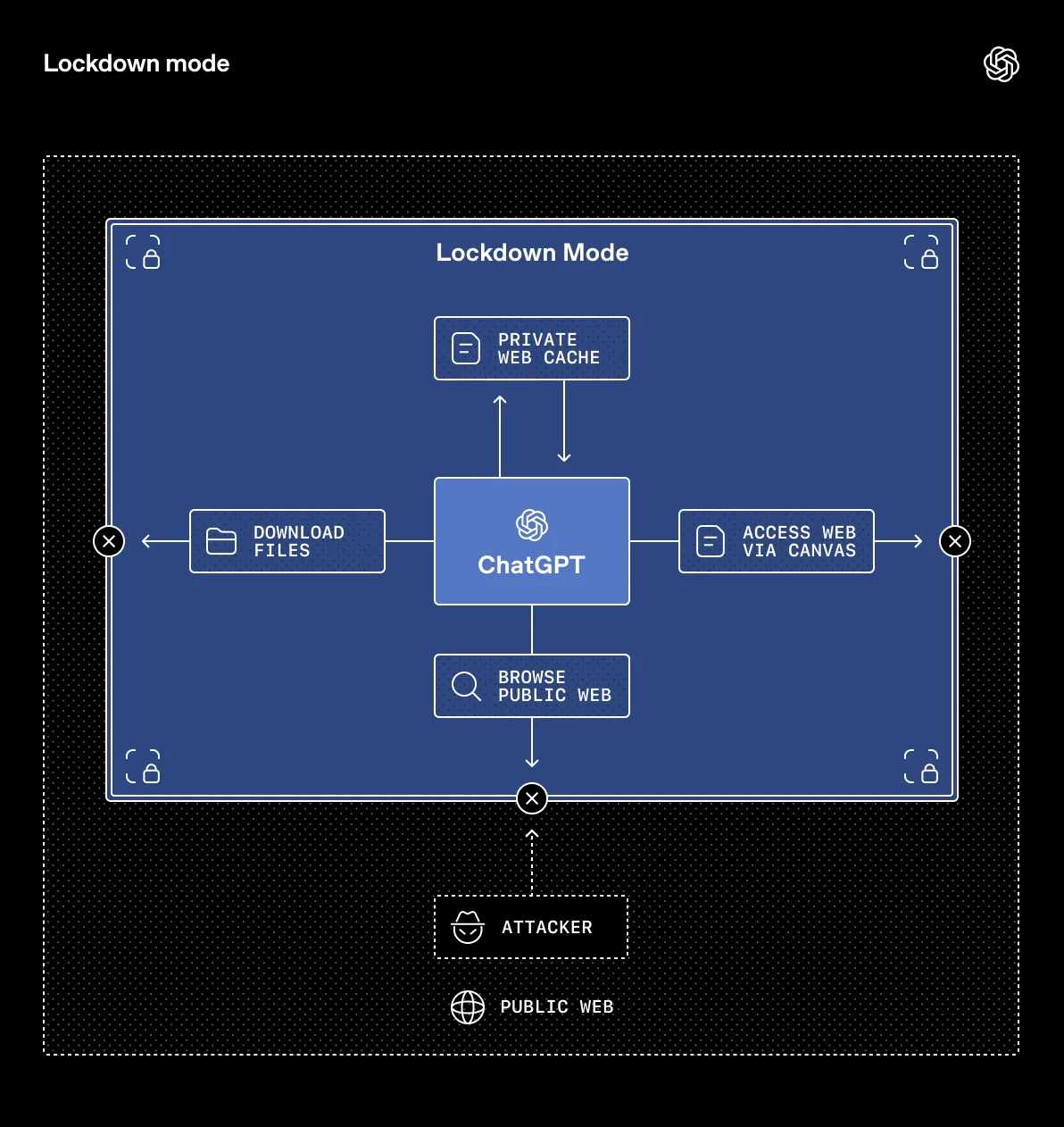
Lockdown Mode is a new deterministic setting that helps guard data from being inadvertently shared with third parties by tightly constraining how ChatGPT can interact with certain external systems.
ChatGPT business plans already provide enterprise-grade data security. Lockdown Mode builds on those protections and is available for ChatGPT Enterprise, ChatGPT Edu, ChatGPT for Healthcare, and ChatGPT for Teachers. Admins can enable it in Workspace Settings(opens in a new window) by creating a new role(opens in a new window). When enabled, Lockdown Mode layers additional restrictions on top of existing admin settings.
Learn more about Lockdown Mode in our Help Center(opens in a new window).
Because some critical workflows rely on apps, Workspace Admins retain more granular controls. They can choose exactly which apps—and which specific actions within those apps—are available to users in Lockdown Mode. Additionally, and separate from Lockdown Mode, the Compliance API Logs Platform(opens in a new window) provides detailed visibility into app usage, shared data, and connected sources, helping admins maintain oversight.
We plan to make Lockdown Mode available to consumers in the coming months.
AI products can be more helpful when connected to your apps and the web, and we’ve invested heavily in keeping connected data secure. At the same time, some network-related capabilities introduce new risks that aren’t yet fully addressed by the industry’s safety and security mitigations. Some users may be comfortable taking on these risks, and we believe it’s important for users to have the ability to decide whether and how to use them, especially while working with their private data.
Our approach has been to provide in-product guidance for features that may introduce additional risk. To make this clearer and more consistent, we’re standardizing how we label a short list of existing capabilities. These features will now use a consistent “Elevated Risk” label across ChatGPT, ChatGPT Atlas, and Codex, so users receive the same guidance wherever they encounter them.
For example, in Codex, our coding assistant, developers can grant Codex network access so it can take actions on the web like looking up documentation. The relevant settings screen includes the “Elevated Risk” label, along with a clear explanation of what changes, what risks may be introduced, and when that access is appropriate.
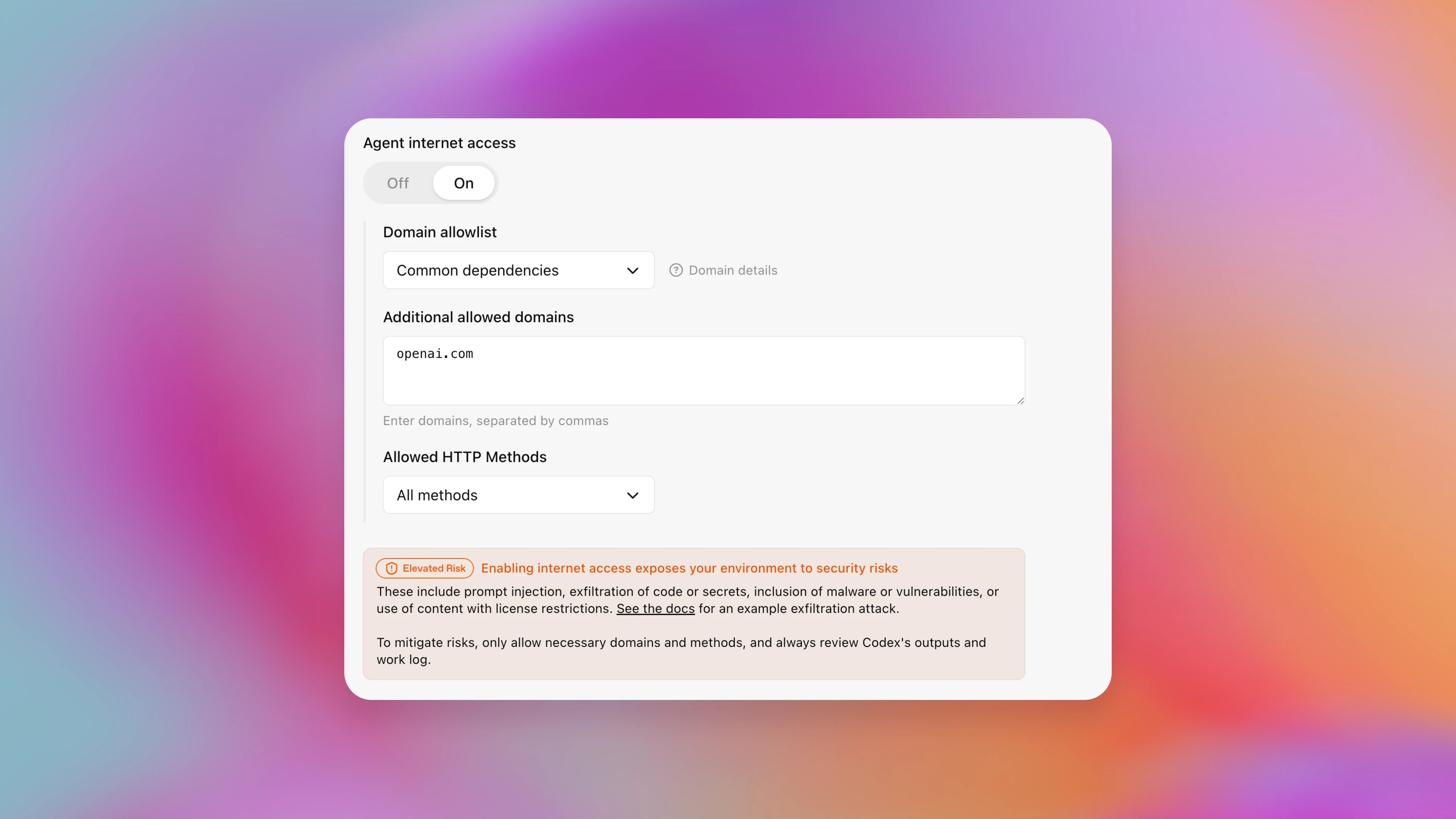
A screenshot of the Codex settings screen where users can configure what network access Codex has.
We continue to invest in strengthening our safety and security safeguards, especially for novel, emerging, or growing risks. As we strengthen the safeguards for these features, we will remove the “Elevated Risk” label once we determine that security advances have sufficiently mitigated those risks for general use. We will also continue to update which features carry this label over time to best communicate risk to users.